Roles and Observers
Observers
An Observer joins a project to watch and learn. You don't have to build anything. Asking questions is the whole point.
What an Observer can do
- Read the project's discussion and Updates, even on a Private project.
- Post in the discussion, if the Creator turned on Observers can comment.
- Add an Observer Block to your Stack.
Observers can't invite people or change settings. Observer can't be combined with Mentor, since you can't be learning and mentoring the same thing.
Join a project as an Observer
- Go to Projects and look for the Open to observers tag.
- Open the project and pick Observer under Join as in the Ask to join box.
- Add a short note about what you hope to learn, and press Ask to join.
- The Creator or an Admin approves you, and the bell lets you know.
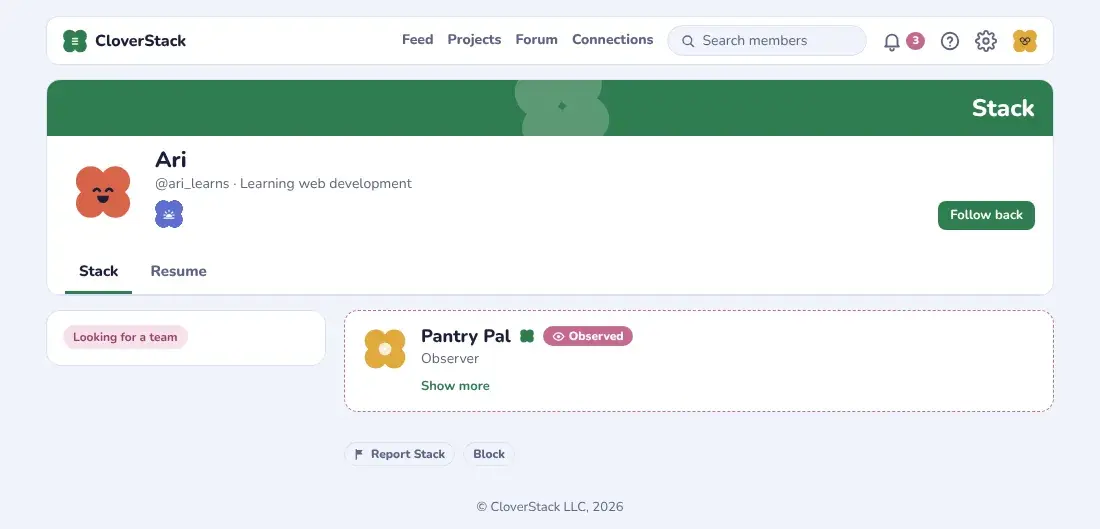
Your Observer Block
Your Observer Block shows the project's title and logo, your role, and your Reflection on what you learned. It has a dashed outline and an Observed tag. Anyone who hovers over or taps the tag sees that you joined to observe and learn.